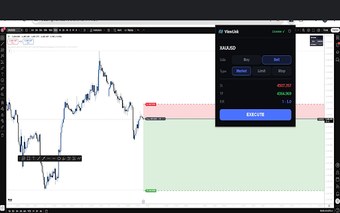
Chart-to-MT5 execution for traders who need precise order placement
ViewLink, built by Kevin and Theo, is a Chrome extension that links TradingView charts to MT5 execution. It sends chart-derived entries, stop losses, and take profits to MetaTrader 5 while automatically calculating lot sizes from live account balances and risk settings. The extension uses a Pine Script indicator, a cloud-hosted backend, and a one-click toolbar for confirmations. It suits discretionary and systematic traders seeking tighter execution control and fewer manual entry errors.
What is ViewLink used for?
ViewLink acts as an execution bridge between chart analysis and order placement, allowing traders to fire orders directly from TradingView charts with a single click. Its core purpose is to remove manual data-entry between analysis and execution, and automate the transmission of entry, stop loss, and take profit levels. Outcomes include fewer transcription mistakes and faster order placement when a chart signal appears.
How does ViewLink handle execution and position sizing?
The tool uses an integrated risk engine that reads live account balances to calculate lot size from user-defined risk parameters. It supports advanced trade management functions, including trailing stops, moving positions to breakeven, and partial position closing. A toolbar icon provides one-click confirmations so users do not need to switch tabs to approve orders before they reach MetaTrader 5.
Does ViewLink remove the need for a VPS?
ViewLink operates on a fully managed, cloud-hosted system so users do not need a personal VPS for the bridge. The developer handles the infrastructure, which simplifies technical setup and reduces local configuration steps. That hosted model changes the deployment workflow compared with self-hosted bridges and shifts maintenance responsibilities away from the trader.
Can ViewLink integrate with TradingView scripts and MetaTrader 5?
Integration relies on a dedicated Pine Script indicator that calculates entry, stop, and target levels on the chart, and a ViewLink Expert Advisor installed on MetaTrader 5 to receive orders. The extension runs in Chrome and other Chromium-based browsers and supports any broker that uses the MT5 platform, including compatible prop firm accounts once the EA and desktop MT5 are set up.
ViewLink is a practical choice for traders prioritizing execution precision
ViewLink is best suited to traders who want tighter execution while retaining decision control, since it executes analysis rather than choosing trades. Test all Pine Script-to-order mappings on a demo account before live use and verify risk parameters in the linked account. Adopt conservative risk settings initially and confirm execution behavior under realistic market conditions.